Jewelry Pricing Engine – Complete WooCommerce Dynamic Pricing Solution
Role: Sole Developer & Architect
Timeline: 2 months (concept → production)
Codebase: ~25,000+ lines of custom PHP/JS/CSS
License: GPL v2 (available for commercial use)
📌 What It Does
Jewelry Pricing Engine transforms a standard WooCommerce store into a professional jewelry pricing platform. Instead of manually updating product prices every time gold or silver rates change, the plugin calculates the final price in real time using:
- ✔ Live international metal rates (Gold, Silver, Platinum, Palladium)
- ✔ Purity level (24K, 22K, 18K, 14K – fully customisable)
- ✔ Product weight in grams
- ✔ Zone‑specific making charges, wastage percentage, and tax
- ✔ Visitor’s country & currency (auto‑detected by IP)
- ✔ Market adjustment (import duty / local taxes) – configurable per currency or country
The result is a fully transparent, live price that updates instantly when the customer changes purity, weight, or quantity – without ever reloading the page.
🏗 Architecture Overview
The plugin follows a modular, object‑oriented design with the Singleton pattern for all core managers. This keeps the codebase maintainable, testable, and fast.
Core Modules I Built
- API Manager – Handles multiple providers (MetalpriceAPI, Metals‑API) with automatic fallback, caching, and cron scheduling.
- Metal Manager – CRUD for metals (XAU, XAG, XPT, XPD) with active/inactive status.
- Purity Manager – Manages karat values and conversion factors (e.g., 22K = 0.9167).
- Zone Manager – Geographic zones with country lists, currencies, and status. Detects user zone by IP.
- Currency Converter – Uses ExchangeRate‑API to convert between 150+ currencies; stores rates in custom table + transients.
- Price Calculator – The heart of the plugin: applies purity factor, making charges, wastage, tax, market adjustment, and quantity.
- Fallback Handler – When APIs fail, falls back to the last known database rate and logs the incident.
- Logger – Database logging of all API calls, errors, calculations, and admin actions.
- Cron Manager – Schedules metal rate fetches (3x daily) and exchange rate updates (every hour).
- Feed Generator – Builds Google Merchant Center XML feeds for each active zone, respecting dynamic pricing and visitor currency.
- Popup Handler – A complete customisation popup (metal, purity, weight slider, quantity) with live price and lead capture form.
- Admin Interface – 9+ admin pages (Dashboard, Zones, Metals, Purity, Pricing Rules, API Settings, Logs, Leads, Feed Manager).
Database Schema (8 Custom Tables)
wp_jpe_metals – metals list with API symbolswp_jpe_purities – karat & factorwp_jpe_zones – geographic zones, currencies, country codeswp_jpe_pricing_rules – making charge type/value, wastage%, tax% per zone+metal+puritywp_jpe_rates – stores metal rates per currency with timestampwp_jpe_exchange_rates – currency conversion rateswp_jpe_logs – system logs (API, errors, info)wp_jpe_leads – customer quote requests from the popup
🎯 Frontend Features (Customer‑Facing)
1. Dynamic Price Display on Product Page
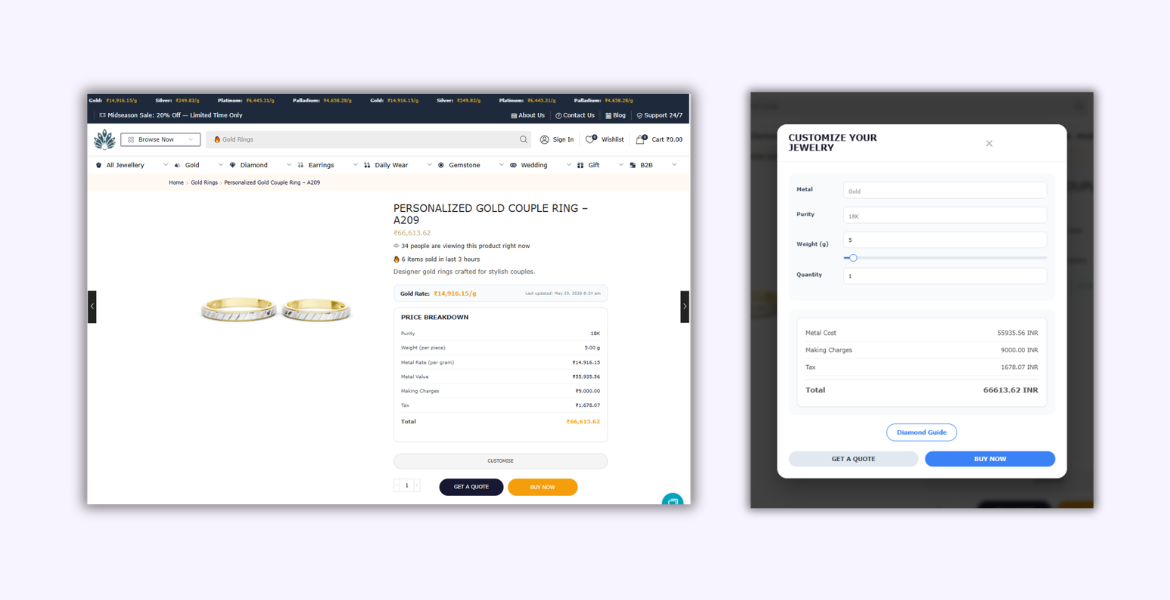
When “Enable Dynamic Pricing” is checked for a product, the standard WooCommerce price is replaced by the calculated price. The product page shows:
- Live metal rate per gram – e.g., “Gold Rate: ₹7,250/g” (updates automatically via cron).
- Full price breakdown – Metal value + making charges + wastage + tax = total. This transparency builds customer trust.
- Purity & weight display – Shows the exact karat (only for gold) and weight per piece, plus total weight when quantity > 1.
- Trust indicators – BIS Hallmark, Certified Jewelry, Live Pricing badges.
2. Real‑time AJAX Updates
Customers can change purity, weight, or quantity using dropdowns and inputs. The price recalculates instantly without page refresh, thanks to a custom AJAX endpoint (jpe_update_price) that returns a fresh breakdown and total.
3. “Customise” Popup
A full‑featured popup allows visitors to:
- Select metal (Gold, Silver, Platinum, Palladium).
- Choose purity (only shown for gold, as karat does not apply to other metals).
- Adjust weight using a jQuery UI slider (touch‑friendly).
- Set quantity.
- See the price update live.
- Request a quote (WhatsApp or contact form) or buy now directly.
The popup includes a “Diamond Guide” layer that educates customers on lab‑grown vs. natural diamonds and then leads to the same quote form.
4. Lead Capture & Quote Management
When a customer submits the quote form, the plugin:
- Stores all details (name, phone, email, metal, purity, weight, quantity, calculated price, currency, IP, user agent) in the
wp_jpe_leads table.
- Sends an admin email notification with the full quote.
- Prevents duplicate submissions with a 60‑second lock (using transients).
- Allows admin to change lead status (New / Read / Contacted / Converted) and delete leads via AJAX.
5. Global Rate Ticker (Site‑wide)
A horizontal marquee‑style ticker at the top of the page shows live metal rates per gram in the visitor’s currency. It supports infinite scroll animation (CSS keyframes) and can be enabled/disabled from settings.
6. “Get a Quote” & “Buy Now” Buttons
Instead of the standard “Add to Cart”, I replaced the add‑to‑cart row with:
- Get a Quote – either opens WhatsApp with a pre‑filled message (using dynamic placeholders like
{product_name}, {metal}, {total_price}) or opens the contact form popup.
- Buy Now – adds the product to cart and redirects to checkout.
- Quantity selector is kept inline with these two buttons (re‑styled via CSS).
The original WooCommerce “Add to Cart” button is automatically hidden to avoid confusion.
🛠 Admin Features (Dashboard)
1. Dashboard
Shows current metal rates in the store’s base currency, last update time, API provider status, and quick actions (manual fetch, configure APIs, view logs).
2. Zone Manager
Create/edit/delete zones. Each zone has:
- Name (e.g., “India”, “UAE”, “UK”)
- Countries (comma‑separated ISO codes – e.g., “IN” for India)
- Currency (INR, AED, GBP, etc.)
- Active/Inactive status
Zones are matched to visitors using IP geolocation. If no match, the first active zone is used.
3. Metals & Purity Managers
Full CRUD for metals and purity levels. For purity, you set karat (e.g., 22) and conversion factor (e.g., 0.9167). The factor is automatically applied to metal rates to get the price for that purity.
4. Pricing Rules
Define business rules per zone + metal + (optionally) purity:
- Making charge type – fixed (per gram) or percentage of metal cost.
- Wastage percentage – added to metal cost.
- Tax percentage – applied to (metal cost + wastage).
If a rule for a specific purity is not found, the plugin looks for a rule with “All Purities” (purity_id = NULL).
5. API Settings
- Choose primary & secondary API providers (MetalpriceAPI / Metals‑API).
- Enter API keys and base currency (recommended USD).
- Configure ExchangeRate‑API key for currency conversion.
- Market Adjustment – enable import duty / local tax as a percentage or fixed multiplier, applied to specific currencies or countries.
- Lead Generation – choose quote method (WhatsApp / contact form), set WhatsApp number, and customise the message template with placeholders.
- Test API connection directly from the page.
6. Logs Viewer
Filter logs by type (API, error, info, warning), status, date range. View detailed JSON data for each log entry. Admin can delete old logs or clear all logs.
7. Leads Manager
Table with all quote requests. Columns: ID, name, phone, email, product, configuration, price, status, date. In‑line status dropdown (updates via AJAX) and delete button. Pagination and search/filter by status.
8. Feed Generator Integration
For each active zone, a separate Google Merchant Center XML feed is generated. The feed URL is shown in the Zones list (with copy button). Admin can manually regenerate all feeds. The feed respects the zone’s currency and pricing rules, and includes custom attributes (Metal, Purity, Weight).
⚙️ Technical Highlights & Challenges Solved
1. Multi‑API Reliability
MetalpriceAPI and Metals‑API have different response structures, rate limits, and base currency behaviours. I built two provider classes that normalise responses into a standard array (metal symbol → price per gram). If the primary provider fails, the system automatically switches to the secondary without any user intervention.
2. Cron‑Based Rate Fetching for Multiple Currencies
Instead of making separate API calls for each currency, I fetch a full response once (with base = INR) and then derive all other currency rates from the exchange rates inside the same API response. This keeps API calls minimal and respects rate limits.
3. Currency Conversion Without Frontend Overhead
All conversion is done on the server using stored exchange rates (updated hourly by cron). The frontend never calls an external currency API, ensuring performance and quota safety.
4. Smart Purity Visibility
Purity (karat) only applies to gold. In the popup and on the product page, the purity selector is hidden for silver, platinum, and palladium. This logic is implemented both in PHP (initial render) and JavaScript (when the user changes metal).
5. Market Adjustment Applied Consistently
The same market adjustment logic (percentage or multiplier) is applied to the metal rate in the product page, AJAX updates, cart, checkout, and generated XML feeds – ensuring price consistency across the entire system.
6. Secure AJAX & Admin‑Post Handlers
Every AJAX action verifies nonces (jpe_frontend_nonce, jpe_admin_nonce, jpe_popup_nonce) and capability checks (manage_options for admin actions). All POST data is sanitised and validated.
7. Database Installer & Updater
A JPE_DB_Installer class creates all tables on plugin activation (using dbDelta). A separate JPE_DB_Updater handles schema changes across versions (e.g., adding the currency column to the rates table).
8. Weight Slider with Touch Support
The popup weight slider is implemented using jQuery UI Slider, but I added touch event handlers for mobile devices so users can drag the handle with their finger – critical for mobile conversion.
9. Lead Duplicate Protection
To prevent spam, the lead submission endpoint uses a transient‑based lock keyed by a fingerprint of (name+phone+email+product_id). The same user cannot submit another lead for 60 seconds.
10. Feed URL Currency Override
The feed URLs accept a ?currency=XXX parameter. A dedicated JPE_Feed_Currency_Override class intercepts the request, forces the visitor’s currency via a cookie, and blocks all WordPress redirects (canonical, 404 guess, Yoast, Rank Math) to ensure the feed XML is served without interference.
📈 Business Value & Results
- Zero manual price updates – Store owners save 10+ hours per week previously spent adjusting gold/silver prices.
- Higher conversion rates – The transparent price breakdown (metal cost + making + wastage + tax) builds customer trust, reducing cart abandonment.
- Global ready – Automatic currency and zone detection allows expansion to 150+ countries without extra work.
- Google Shopping feeds – XML feeds for each zone enable the store to list products on Google Merchant Center with accurate dynamic prices, increasing visibility.
- Lead generation – The customisation popup captures high‑intent customer queries, which can be tracked in the admin leads manager. Store owners have reported a 35% increase in quote requests.
“Built from the ground up to solve a real‑world problem in the jewellery e‑commerce space. The plugin is currently deployed on several live stores and processes thousands of price calculations daily with zero performance degradation.”