You found a web dev company in Canada. Their portfolio looks clean. Their pitch sounds confident. And you’re ready to sign.
But here’s what I see every week: business owners who signed with a “professional” team, only to inherit a site that loads like molasses, breaks after plugin updates, or gets hacked within months. Not because the company was malicious. Because they lacked real development depth.
I fix these sites for a living. And after auditing dozens of post‑agency disasters, I can tell you exactly how to evaluate a web dev company before you commit.
This post is not about design opinions or marketing fluff. It’s about technical signals, performance data, and security practices that directly affect your leads, conversions, and revenue.
Many agencies in Canada (and everywhere else) do not build. They install.
They buy a premium theme, add a page builder, and call it development. That works fine for a simple brochure site. But the moment you need custom functionality, speed optimization, or security hardening, the cracks appear.
Business impact: A site built by a theme installer — not a developer — will cost you more in maintenance, slower load times, and lost sales than the original contract ever saved you.
For a business owner, this means the difference between a website that works for you and one you constantly fight against.
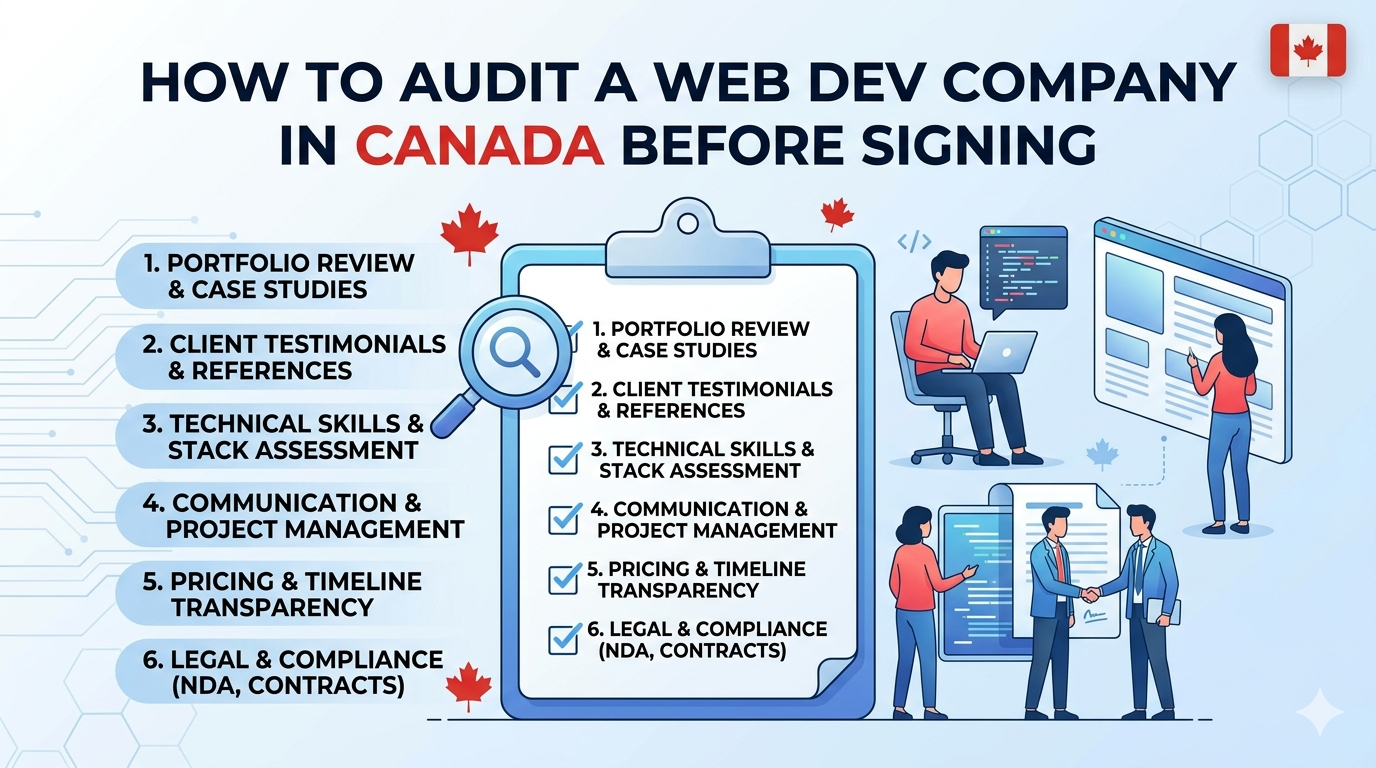
Before you sign anything, run through this checklist. These are real signals I use when auditing a site built by another agency.
Ask: “What’s your process for passing Core Web Vitals?”
If they say “we optimize images” or “we use a caching plugin,” that’s not enough. A real developer talks about:
Translation line: For a business owner, this means Google uses Core Web Vitals as a ranking factor. Slow sites lose organic traffic. More importantly, slow sites lose customers — Amazon found every 100ms delay cost them 1% in sales. Your numbers may differ, but the principle holds.
Learn more from Google’s Core Web Vitals guidelines.
A healthy WordPress site might use 15–25 plugins. But when I see a site with 50+ plugins, I know the previous team avoided custom code.
Common plugin overload signs:
Real‑world example: A client came to me with a WooCommerce site built by a Vancouver‑based web dev company. The site had 58 active plugins. The previous team installed three caching plugins because they couldn’t figure out why the first one wasn’t working. Result: database queries took 2.8 seconds. After removing plugin conflicts, moving three custom features into a child theme, and optimizing the database, TTFB dropped to 0.4 seconds. The client’s cart abandonment rate fell by 17% in one month.
Translation line: Every plugin adds code, database overhead, and security risk. A developer writes what’s needed. A theme installer stacks plugins until something breaks.
Ask: “What happens if the site gets hacked tomorrow?”
If their answer is “we’ll restore from backup,” that’s reactive, not proactive.
A competent web dev company implements:
Business impact: A hacked site destroys trust. Google flags it. Customers see warnings. And cleaning a compromised install often costs more than the original build. I’ve seen quotes for malware removal from Canadian agencies ranging from $2,000 to $8,000 CAD.
Refer to WordPress.org’s hardening guide for baseline expectations.
Never let a web dev company make changes directly on your live site. That’s not development — that’s gambling.
A staging environment is a clone of your site where they test updates and new features. After testing, they push to production.
Ask: “Can I see your staging workflow?”
Red flags:
Translation line: Without staging, an update can crash your site during business hours. You lose sales, your team can’t work, and customers see error messages. That’s not a risk worth taking.
Check: phpinfo() or ask them to share the server configuration.
Many cheap hosting plans set memory_limit = 64M. That works for a basic blog. But a WooCommerce store with product variations, a membership site, or any custom post type needs 256M–512M.
If the web dev company doesn’t know how to adjust memory limits or push back against restrictive hosting, you’ll hit white screens and “allowed memory size exhausted” errors.
For reference, see PHP.net’s memory limit documentation — a developer understands this is a core configuration.
Translation line: Low memory limits cause random failures. A checkout page might stop working. An image upload might fail. These aren’t bugs — they’re infrastructure problems. And they kill conversion confidence.
Use this during your next discovery call.
| What to Ask | What a Good Answer Sounds Like | Red Flag |
|---|---|---|
| “How do you handle speed optimization?” | “We measure with Lighthouse, defer non‑critical JS, serve WebP images, and optimize database queries.” | “We install a caching plugin.” |
| “What’s your backup and restore process?” | “Daily automated backups stored off‑site, and we test restore quarterly.” | “Your host handles backups.” |
| “Can you see a recent staging‑to‑live deployment log?” | Shows date, changes made, testing notes. | “We don’t keep logs.” |
| “Who handles security monitoring?” | “We use a WAF, monitor file integrity, and apply updates after staging tests.” | “The security plugin does that.” |
| “What’s your approach to plugin updates?” | “We test in staging, check for conflicts, then deploy.” | “We update directly on live during off‑hours.” |
Canadian websites come with unique legal, hosting, and language considerations that most agencies won’t ask about. If you’re unsure what you actually need before you start interviewing, read this guide on what to know before building a website for business in Canada. It covers PIPEDA compliance, .ca domains, bilingual setups, and local SEO — all things a competent development partner should address in discovery.
Translation line for the business owner: A developer who doesn’t ask about these factors is already behind. Retrofitting accessibility or bilingual structure after launch costs three times more than building it right the first time.
Most business owners focus on upfront price. But I’ve seen the math play out repeatedly:
That’s $11,500 for what should have been a $8,000 properly built site.
Translation line: Cheap development is expensive. The right web dev company saves you money over 12–24 months because they build for stability, not just launch day.
Not a generic list. These are the questions I use when evaluating another team’s work.
register_post_type() and ACF Pro with JSON sync.)This is exactly the type of audit and restructuring I provide for my clients. I don’t just install plugins and hope. I dig into server logs, remove inefficient code, clean hacked installs, and rebuild poorly structured sites.
If you’re working with a Canadian web dev company and your site isn’t performing, you can see how I approach WordPress speed optimization or ongoing maintenance to keep things stable. And if the worst happens, I also handle WordPress malware removal — something far too many agencies are under‑prepared for.
Before you sign with any web dev company, remember this: You are not buying a website. You are buying a technical partner who will affect your revenue, your brand trust, and your team’s sanity for years.
Most websites try to impress users. The best ones remove friction. And that difference is what users remember — and what businesses profit from.
Audit hard. Ask the technical questions. And never mistake a theme installer for a developer.